Maximize Fall School Picture Sales with This Simple, Repeatable Workflow
Fall is peak season for school photography, and if you’re looking for a sales system that drives results without creating chaos, you’re in the right place.
At imago, we believe in keeping things simple while still delivering for your bottom line. In this guide, Shawn Cantrell—head of Schools and Sports at H&H Color Lab—shares how school photographers are using a pre-sale + gallery sale strategy to maximize orders in a short window of time.
The Strategy: Pre-Sale + Gallery Sale
It all starts with the right structure. Instead of trying to run a long, slow burn sale all year, Shawn recommends focusing on two core phases:
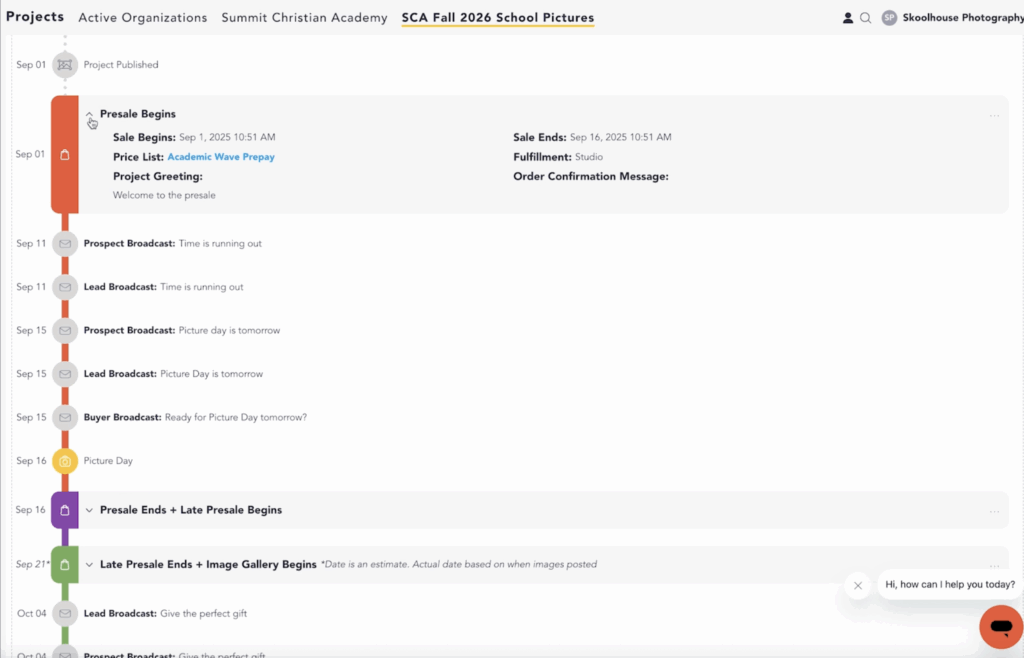
Pre-Sale (Before Picture Day): Launch ordering early with a clear deadline. Use both flyers and online links. This helps parents get orders in before picture day—many of whom are motivated to save on shipping.
Gallery Sale (After Picture Day): Once images are uploaded, reopen ordering for anyone who missed the first round. You’ll often pick up an additional 10–15% in late orders. This also gives you the ability to push for additional sales around holidays like Mother’s Day and graduation.
Together, this two-phase system lets you capture orders before and after picture day, with less confusion and better communication.
How to Set It Up in imago
Setting up your school projects inside imago is straightforward. Here’s how it works:
- Start with a Template: Use a preset if you’re photographing multiple schools. This ensures consistency and saves time.
Build Your Journey: Choose the journey that fits your sales plan. For this strategy, you’ll select one that includes a pre-sale and a gallery sale.
Set Key Dates: Define your picture day, presale launch, and final ordering deadline. Many photographers keep galleries open through the end of the school year to catch last-minute or seasonal purchases.
Assign Price Lists: Create separate pricing for prepay, late orders (with added shipping), and the gallery sale.
Enable Marketing: Turn on automated campaigns and let Imago do the work of reminding parents to order.
Secure the Galleries: Use individual access codes (like student ID numbers) to protect images and simplify the login process for parents.
Customize Forms: Collect teacher names, grades, or other needed info with required fields and dropdowns.
Design Your Greeting: Create a message that welcomes families, explains the process, and encourages ordering. Keep it clear, professional, and on-brand.
Once your project is set up, you can save it as a preset and duplicate it for every school on your list.
Why This Works
Photographers who implement this workflow consistently see:
- Higher average order values
Fewer customer service calls
More repeatable, efficient systems
Better client satisfaction from schools and parents alike
If you’re tired of reinventing the wheel every season, imago gives you the tools to run a seamless experience—from presale to gallery delivery.
Ready to simplify your fall workflow and increase your sales?
Set up your first project in imago today and see how easy it is to run your school photography business at scale. Whether you’re photographing 5 schools or 500, we’re here to help you streamline the process.
Fill out your info below to get started now.