If you’re a dance photographer juggling multiple poses, packages, and performances, you know the chaos of recital season. With imago, you have access to a streamlined, modern solution for managing online galleries—so you can focus on creating stunning images while maximizing sales.
In this guide, Shawn Cantrell from H&H Color Lab walks through how to set up a modern dance photography gallery using imago’s intuitive platform. Dance photography isn’t just sports photography with sequins—it’s a high-volume, multi-costume, multi-group operation that demands a smarter way to organize, market, and sell. That’s where imago comes in.
Step 1: Create a Project in imago
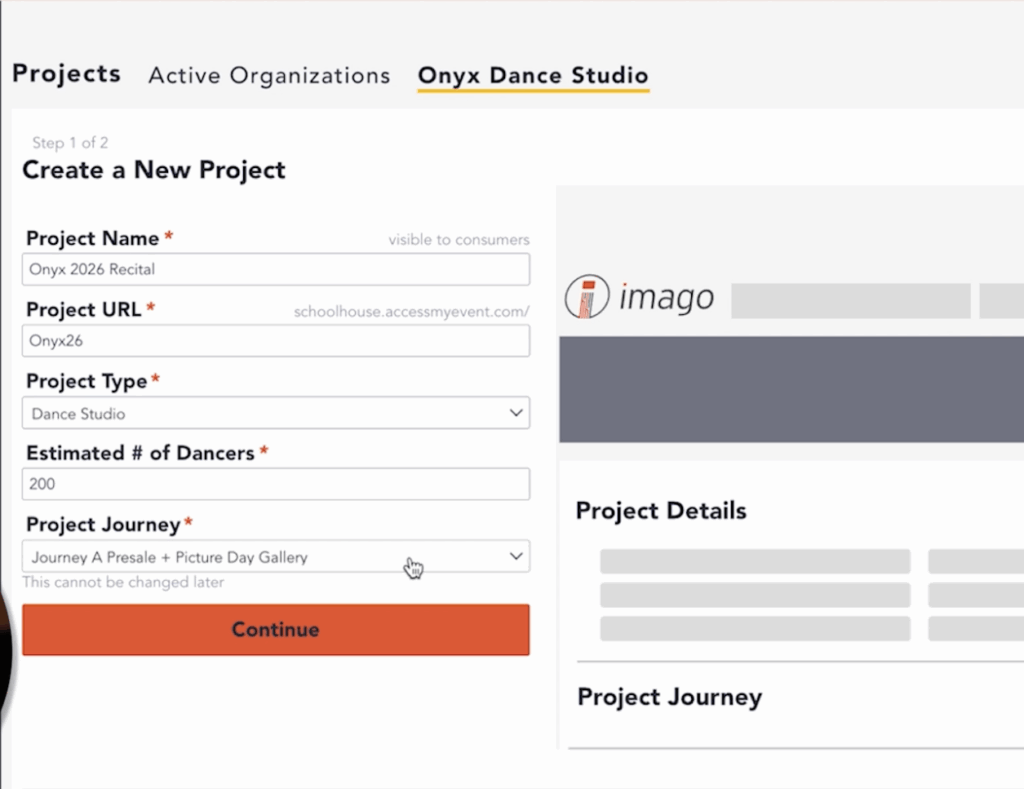
Start by creating a new project in your imago dashboard under your organization. For this example, Shawn uses “Onyx Dance Studio” and names the event “Onyx 2026 Recital.” Choose the type of photography as “Dance,” and input the estimated number of dancers (e.g., 200).
Set a custom, easy-to-remember URL for the gallery. This will serve as your central hub for orders, marketing, and tracking.
Step 2: Choose the Right Journey
The “Journeys” feature lets you design a sales flow that matches your studio’s needs. Instead of one static gallery, Shawn recommends a short-term proof gallery sale followed by a longer, open-ended gallery.
This two-phase approach is designed to drive urgency:
Proof Gallery: Live for 7–10 days, offering the best deals
Full Gallery: Opens after the proof window, available through the summer
This tactic leverages psychological triggers—limited time and fear of missing out—to boost conversions.

Step 3: Market Before Picture Day
The worst scenario? Parents show up with no idea that it’s picture day. With imago, you can easily automate marketing before and after the shoot.
Build marketing workflows tied to important milestones:
Pre-event awareness
Picture day reminders
Proof gallery launch
Final ordering window
You can also segment communications between prospective leads and confirmed buyers to avoid message fatigue.
Step 4: Customize Your Experience
Imago allows photographers to personalize every step—from the login greeting to how dancers’ levels are tracked and matched to packages. Use dropdown menus or open fields to collect key data and map it to your H&H Schools system if applicable.
Want to go minimal? We support that too. Set it up quickly and efficiently without compromising professionalism.
Step 5: Launch & Adjust
Once you publish your project, you can preview the gallery URL—even before uploading images. If you need to change a date or push the gallery launch, imago automatically adjusts your entire marketing and sales timeline without any manual rework.
Everything stays synced. Everything just works.
Final Thoughts
Dance photography may feel overwhelming, but with the right tools, it doesn’t have to be. Imago gives photographers the structure and automation needed to manage high-volume dance events with confidence and ease.
Whether you’re a seasoned pro or new to the world of recitals, this setup gives you a repeatable formula to deliver a seamless experience for both you and your clients.
Ready To Get Started?
Fill out the form below to explore how imago can streamline your next dance photography event.